


You’re staring at your email marketing platform, a blank canvas waiting for direction. You know you should be sending emails, but the thought of manually crafting and sending individual messages to your subscribers feels overwhelming, and frankly, inefficient. This is where email marketing workflows, or automations, come in. They are the secret sauce that transforms your email marketing from a chore into a powerhouse of engagement, conversions, and customer nurturing. Think of them as your automated marketing team, working tirelessly behind the scenes to deliver the right message to the right person at precisely the right time.
You’ve likely experienced workflows yourself. That welcome email you receive immediately after signing up for a newsletter? That’s a workflow. The abandoned cart reminder you get after leaving items in an online store? Another workflow. They’re designed to be seamless, helpful, and often, incredibly effective. In this article, you’ll delve deep into the world of email marketing workflows, understanding not just what they are, but why they are crucial and how you can build them to propel your business forward.
Before you can build a sophisticated automated system, you need to grasp the fundamental concept. At its core, an email marketing workflow is a series of automated emails triggered by specific user actions or a set of predefined conditions. It’s a pre-programmed sequence designed to guide subscribers through a particular journey, delivering valuable content and nudging them towards desired outcomes, like making a purchase, downloading a resource, or engaging further with your brand.
The Automation Engine: Triggers and Actions
Every workflow hinges on two core components: triggers and actions. Understanding these is paramount to designing effective automations.
Understanding Triggers: The Spark of Automation
A trigger is the event that initiates a workflow. It’s the digital cue that tells your email marketing platform, “Hey, something just happened! Time to start sending emails!” Without a trigger, there’s no automation. The beauty of well-designed triggers is that they ensure your messages are relevant and timely, delivered when the subscriber is most receptive.
Common Trigger Types: What Gets the Ball Rolling?
You’ll encounter a variety of triggers, each suited to different marketing goals. Recognizing these will help you brainstorm potential workflows for your own business.
- Subscription Triggers: These are among the most fundamental. When a new subscriber joins your newsletter list, signs up for a webinar, or downloads a lead magnet, that’s a subscription trigger. It signifies their initial interest in your brand.
- Behavioral Triggers: These are powered by how subscribers interact with your website or previous emails. This includes actions like visiting specific pages, clicking links in past emails, making a purchase, or even engaging with your social media. Behavioral triggers are incredibly powerful because they reveal explicit intent and interest.
- Time-Based Triggers: These are scheduled automations that run on a specific date or time. Examples include birthday emails, anniversary emails, or re-engagement reminders after a period of inactivity.
- Form Submission Triggers: When a subscriber fills out a specific form on your website – whether it’s a contact form, a survey, or a free trial signup – this can trigger a tailored email sequence.
- E-commerce Triggers: For online businesses, these are goldmines. Abandoned cart, post-purchase follow-ups, and product restock notifications are all e-commerce triggers.
Understanding Actions: The Automated Response
Once a trigger is activated, the workflow executes a series of actions. These are the specific tasks your email marketing platform performs in response to the trigger.
Common Action Types: What Happens Next?
Actions are what your subscribers actually receive and experience as part of the automated journey.
- Sending an Email: This is the most common action. You’ll craft specific emails to be sent as part of the sequence. These emails can vary greatly in content and purpose, from welcoming new subscribers to offering discounts.
- Adding or Removing Tags: Tags are like labels you can assign to subscribers based on their actions or interests. Adding a tag can segment your audience for future campaigns, while removing one can signify they’ve completed a certain part of a journey.
- Updating Subscriber Information: You can use workflows to update custom fields, such as a subscriber’s last purchase date or their preferred product category.
- Delaying Actions: This is crucial for pacing your workflow. You can set a specific delay—hours, days, or even weeks—before the next email is sent or action is taken. This prevents overwhelming subscribers.
- Branching Logic (Conditions): This is where workflows become truly intelligent. You can set conditions within a workflow, meaning the path a subscriber takes depends on their actions or attributes. For example, if a subscriber clicks a specific link, they might be sent down one path; if they don’t, they might be sent down another.
- Unsubscribing or Opting Out: In some cases, a workflow might lead to a subscriber being unsubscribed, perhaps after repeated non-engagement.
The Difference Between a Broadcast and a Workflow
It’s important to distinguish workflows from broadcast emails. Broadcasts are one-off emails sent to a segment of your list for a specific announcement, promotion, or newsletter. Workflows, on the other hand, are automated and pre-planned sequences designed to engage subscribers over time based on their interactions. Think of broadcasts as shouting a message, and workflows as having a personalized conversation.
In exploring the intricacies of email marketing workflows, it’s essential to consider the tools and resources that can enhance your campaigns. A related article that provides valuable insights is titled “50 Free Email Marketing Templates for Today’s Businesses,” which can be found at this link. This article offers a variety of templates that can streamline your email marketing efforts, making it easier to implement effective workflows and engage your audience.
Why Are Email Marketing Workflows So Powerful?
You might be thinking, “I can just send emails manually.” While that’s technically true, it’s incredibly inefficient and misses out on the immense benefits that workflows offer. They are not just a convenience; they are a strategic necessity for any email marketer looking to grow and scale.
Maximizing Efficiency and Saving Time
You’ve got a million things on your plate. Manually managing individual email sends for every possible scenario is a recipe for burnout. Workflows automate these repetitive tasks, freeing up your valuable time to focus on strategy, content creation, and other high-impact activities.
The “Set It and Forget It” (Almost) Mentality
Once a workflow is built and tested, it runs on autopilot. This doesn’t mean you can completely forget about it. Regular monitoring and optimization are crucial. However, the initial effort of setting up a workflow yields continuous returns without requiring constant manual intervention. Imagine the hours you save by having your welcome sequence, for instance, automatically engaging new subscribers from day one.
Consistent and Timely Communication
In a fast-paced digital world, timing is everything. Subscribers are more likely to engage with your emails when they are relevant to their current needs or interests.
Delivering Value at the Right Moment
Workflows ensure that your subscribers receive the right message at the opportune moment. This could be as they are first learning about your brand, considering a purchase, or even after they’ve become a loyal customer. This contextual relevance significantly increases the likelihood of engagement and conversion.
Personalized Subscriber Experiences
No two subscribers are alike. They have different needs, interests, and stages in their customer journey. Manual segmenting and sending for every individual is impossible.
Tailoring Content to Individual Journeys
Workflows enable you to create highly personalized experiences. By segmenting your audience based on their behaviors and preferences, you can send them emails that speak directly to their specific situations. This level of personalization fosters a deeper connection with your brand and makes subscribers feel understood and valued.
Increased Engagement and Conversions
When your emails are relevant, timely, and personalized, subscribers are far more likely to open them, click on the links, and take the desired actions.
Driving Sales and Nurturing Leads
Workflows are incredibly effective at moving leads down the sales funnel. A well-designed onboarding sequence can educate prospects, an abandoned cart workflow can recover lost sales, and a re-engagement workflow can win back inactive subscribers. Ultimately, this translates into increased revenue and a healthier customer base.
Improved Customer Retention and Loyalty
Workflows aren’t just for new leads. They’re also vital for nurturing existing customers and fostering long-term loyalty.
Building Lasting Relationships
Post-purchase follow-ups, loyalty programs, and exclusive content delivered through workflows can make your customers feel appreciated and keep them coming back. This ongoing engagement strengthens the customer relationship and reduces churn.
Common Types of Email Marketing Workflows You Can Implement

Now that you understand the power of workflows, let’s dive into specific examples that you can start implementing in your own email marketing strategy. Each of these can be tailored to your unique business and audience.
The Welcome Series: First Impressions Matter
This is perhaps the most fundamental and impactful workflow you can set up. When someone subscribes to your list, they’ve shown initial interest. Your welcome series is your opportunity to make a great first impression, set expectations, and guide them into your brand’s ecosystem.
Setting the Tone and Onboarding New Subscribers
Your welcome series should be more than just a single “thank you” email. It’s a multi-email journey designed to introduce your brand, highlight your value proposition, and encourage immediate engagement.
Essential Emails in a Welcome Series:
- Welcome Email 1 (Immediate): This email should be sent instantly upon subscription. It’s your immediate welcome, a thank you for joining, and a confirmation of what they can expect. You might include a link to your most valuable resource, a brief overview of your brand, and instructions on how to get the most out of your emails.
- Value Proposition Email: This email focuses on the benefits of being a subscriber and what makes your brand unique. Highlight the problems you solve, the advantages you offer, and why they made the right decision to subscribe.
- Content Showcase Email: Introduce your best content – blog posts, guides, case studies, or videos. This demonstrates your expertise and provides immediate value.
- Social Proof/Community Email: If applicable, showcase testimonials, customer success stories, or encourage them to join your social media communities. This builds trust and belonging.
- Call to Action Email: This email might gently nudge them towards a specific action, such as making their first purchase with a special discount, browsing your most popular products, or signing up for a free trial.
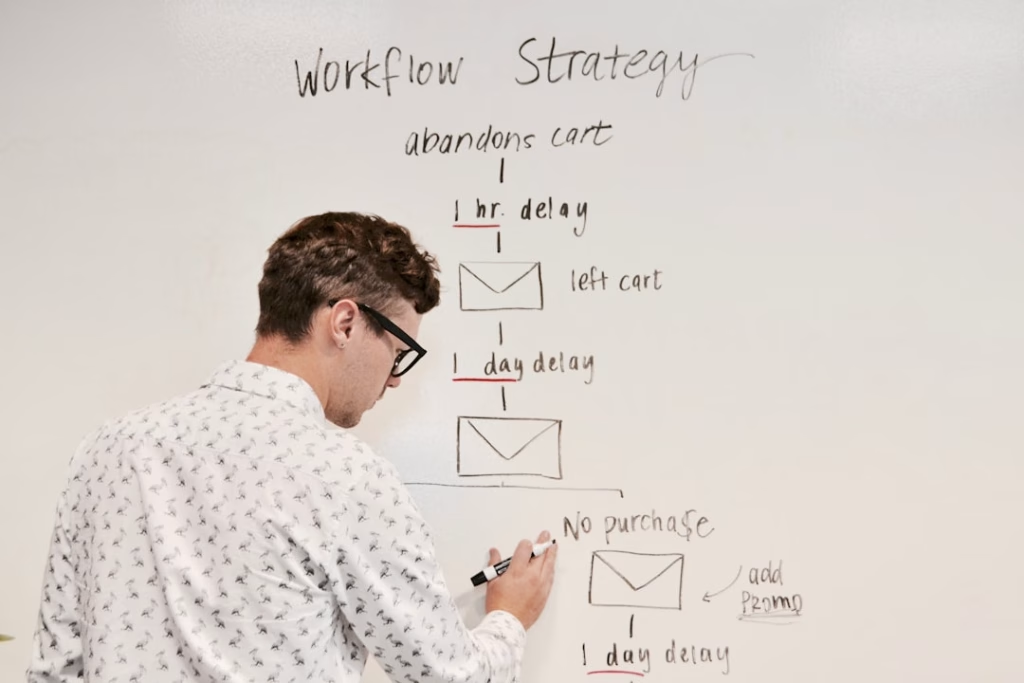
Abandoned Cart Workflow: Reclaiming Lost Sales
For e-commerce businesses, this workflow is an absolute game-changer. A significant percentage of online shoppers abandon their carts before completing a purchase. This workflow is designed to gently remind them of their forgotten items and incentivize them to return and check out.
Recovering Potential Revenue and Frictionless Checkout
This workflow is about being a helpful assistant, not an annoying pest. The key is to be timely and offer a gentle nudge that solves potential issues the customer might have faced.
Steps in an Effective Abandoned Cart Workflow:
- Email 1 (A few hours after abandonment): A simple reminder of the items left in their cart. Include images of the products and a direct link back to their cart. You might also offer assistance if they encountered any problems.
- Email 2 (24-48 hours after abandonment): If they still haven’t converted, this email can introduce a small incentive, such as a discount code or free shipping, to encourage them to complete their purchase. You can also highlight the benefits or urgency of the items in their cart.
- Email 3 (Several days after abandonment): This might be a final attempt, perhaps with a slightly larger discount or a reminder of stock levels if applicable. Some businesses also offer alternative product recommendations at this stage.
Lead Nurturing Workflows: Guiding Prospects to Conversion
When someone downloads a lead magnet or expresses interest in a specific product or service, they are showing a certain level of intent. Lead nurturing workflows are designed to educate these prospects, build trust, and guide them towards making a purchase or becoming a customer.
Building Trust and Demonstrating Expertise
This is where you become a trusted advisor, offering valuable information and building a relationship over time. The content you share should be relevant to their expressed interests.
Examples of Lead Nurturing Workflows:
- Interest-Based Nurturing: If a prospect downloaded a guide on “Beginner SEO tips,” your workflow should continue to offer SEO-related content, case studies of businesses that improved their SEO, and eventually, solutions (your services or products) that can help them achieve their SEO goals.
- Product-Specific Nurturing: If a prospect showed interest in a particular product or service (e.g., by visiting its page multiple times), your workflow can send them more detailed information about its features and benefits, customer testimonials, and perhaps even a demo or consultation offer.
- Webinar Follow-Up: If someone registered for a webinar but didn’t attend, or attended but didn’t take a next step, a follow-up workflow can share the recording, key takeaways, and a relevant call to action.
Re-engagement Workflows: Winning Back Dormant Subscribers
It’s inevitable that some subscribers will become inactive over time. They might stop opening your emails, perhaps due to inbox overload or a change in their interests. Re-engagement workflows are designed to win these subscribers back, or at least determine if they are still interested in hearing from you.
Reigniting Interest and Maintaining List Hygiene
These workflows are crucial for maintaining a healthy and engaged email list. A list full of inactive subscribers can negatively impact your sender reputation and deliverability rates.
Strategies for Re-engagement Workflows:
- The “We Miss You” Email: This is often the first in a re-engagement sequence. It’s a friendly reminder that you haven’t heard from them in a while and you’d love to reconnect. You might offer a special incentive or highlight what they’ve missed.
- Preference Update Request: Ask subscribers if they’d like to update their preferences or receive emails less frequently. This gives them control and can help you segment your audience more effectively.
- Last Chance Email: If they still haven’t engaged after a few attempts, this final email can be a “last chance to stay subscribed” message. You can explain that you’ll be removing inactive subscribers from your list if they don’t reconfirm their interest. This is a vital step for list hygiene.
Post-Purchase Workflows: Enhancing Customer Lifetime Value
The customer journey doesn’t end after the sale. Post-purchase workflows are essential for fostering loyalty, encouraging repeat business, and turning customers into brand advocates.
Building Loyalty and Driving Repeat Business
These workflows assure customers that you value their business beyond the initial transaction.
Key Post-Purchase Workflow Emails:
- Order Confirmation and Shipping Updates: While often automated by your e-commerce platform, these are the first critical automated touchpoints. Ensure they are clear, branded, and provide all necessary information.
- Thank You and Product Usage Tips: A sincere thank you after the purchase, along with helpful tips on how to use or care for the product, can enhance the customer experience.
- Review Request: After a reasonable time, ask for a product review. Social proof is incredibly powerful, and satisfied customers are often happy to share their experiences.
- Related Product Recommendations: Based on their purchase, suggest complementary products or services. This can drive upsells and cross-sells, increasing customer lifetime value.
- Loyalty Program Onboarding: If you have a loyalty program, this workflow can introduce it and explain its benefits, encouraging continued engagement.
Designing and Implementing Your Email Marketing Workflows
Building effective workflows requires careful planning, creative execution, and ongoing optimization. It’s not just about setting up emails; it’s about crafting a cohesive and valuable journey for your subscribers.
Step 1: Define Your Goals
Before you even open your email marketing platform, you need to clearly define what you want each workflow to achieve. Are you aiming to increase sales, improve lead quality, boost customer retention, or something else? Having a clear goal will guide every decision you make.
Identifying Specific, Measurable, Achievable, Relevant, Time-bound (SMART) Goals
For each workflow, ask yourself:
- What specific action do you want the subscriber to take?
- How will you measure the success of this workflow? (e.g., conversion rate, open rate, click-through rate)
- Is this goal realistic for your audience and your business?
- How does this goal align with your overall marketing objectives?
- What is the timeframe for achieving this goal?
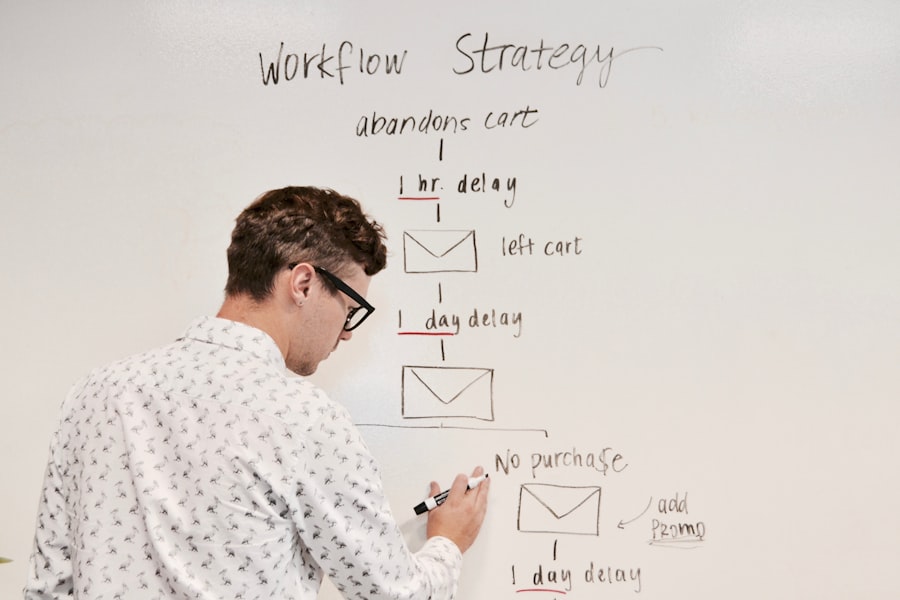
Step 2: Map Out Your Subscriber Journeys
Visualize the path your subscribers will take. Think about the different stages of their relationship with your brand and the touchpoints where an automated email would be most beneficial.
Creating Flowcharts and Customer Journey Maps
Use visual tools like flowcharts or customer journey maps to outline the sequence of events, triggers, and actions for each workflow. This helps you identify potential bottlenecks, decision points, and opportunities for personalization. Consider common user questions or pain points at each stage.
Step 3: Segment Your Audience Wisely
Not all subscribers are the same. Effective segmentation is key to delivering relevant content and maximizing the impact of your workflows.
Leveraging Data for Precise Targeting
Segment your audience based on:
- Demographics: Age, location, gender, etc.
- Behavioral Data: Website activity, purchase history, email engagement.
- Interests: Topics they’ve shown interest in, lead magnet downloads.
- Lifecycle Stage: New subscriber, engaged lead, loyal customer, inactive subscriber.
Step 4: Craft Compelling Email Content
The emails within your workflows are your communication touchpoints. They need to be well-written, visually appealing, and provide genuine value.
Writing Engaging Copy and Designing Visually Appealing Emails
- Personalize everything: Use merge tags to include subscriber names and other relevant information.
- Focus on benefits, not just features: Explain how your offering solves a problem or improves their lives.
- Keep it concise and scannable: Use headings, bullet points, and short paragraphs.
- Have clear Calls to Action (CTAs): Tell subscribers exactly what you want them to do.
- Maintain brand consistency: Ensure your emails align with your brand’s voice and visual identity.
- Optimize for mobile: Most emails are opened on mobile devices, so ensure your design is responsive.
Step 5: Build and Test Your Workflows
This is where you bring your plans to life within your email marketing platform. Thorough testing is critical to ensure everything functions as intended.
Thoroughly Testing Every Branch and Condition
- Set up triggers and actions accurately.
- Test different scenarios: Go through the workflow yourself as if you were a new subscriber or a customer.
- Check all links and CTAs.
- Verify message delivery and timing.
- Ensure conditional logic works correctly.
Step 6: Monitor, Analyze, and Optimize
Workflows are not set-it-and-forget-it operations. Continuous monitoring and optimization are essential for maximizing their effectiveness.
Iteratively Improving Performance with Data
- Track key metrics: Open rates, click-through rates, conversion rates, unsubscribe rates.
- Analyze what’s working and what’s not.
- A/B test different subject lines, email copy, CTAs, and even timing.
- Refine your segmentation and personalize further.
- Update content periodically to keep it fresh and relevant.
Understanding email marketing workflows is crucial for any business looking to enhance its communication strategy. For those interested in automating their processes further, a related article discusses how to streamline list management and suppression using an API. This resource provides valuable insights that can complement your knowledge of workflows and improve your overall email marketing efficiency. You can read more about it in the article on automating list management.
The Future of Email Marketing Workflows
| Stage | Description |
|---|---|
| 1. Planning | Defining goals, target audience, and content strategy. |
| 2. Content Creation | Writing and designing email content and templates. |
| 3. List Segmentation | Segmenting the email list based on demographics, behavior, etc. |
| 4. Automation Setup | Setting up automated triggers and workflows. |
| 5. Testing | Testing emails for deliverability, rendering, and engagement. |
| 6. Deployment | Scheduling and sending out the emails. |
| 7. Analysis | Measuring the performance and analyzing the results. |
As technology evolves, so too will email marketing workflows. You’ll see even more sophisticated automation possibilities, deeper integrations, and AI-driven personalization that was once the stuff of science fiction.
Leveraging AI and Machine Learning
Artificial intelligence and machine learning are already starting to play a significant role in email marketing. Expect to see AI-powered tools that can:
Predicting Subscriber Behavior and Optimizing Content
- Personalized send times: AI can analyze when individual subscribers are most likely to open emails.
- Dynamic content optimization: AI can select the best content and offers for each subscriber in real-time.
- Predictive analytics: AI can forecast which subscribers are most likely to churn or convert.
- Automated copywriting suggestions: AI can help craft more effective subject lines and email copy.
Deeper Integrations with Other Marketing Channels
The future of workflows lies in their seamless integration with other marketing channels, creating a truly omnichannel experience for subscribers.
Creating a Unified Customer Experience Across Platforms
Imagine a workflow that triggers a personalized ad on social media after someone abandons their cart, or a workflow that sends a push notification on your mobile app when a customer reaches a new loyalty tier. This interconnectedness will create a more cohesive and impactful customer journey.
Emphasis on Privacy and Consent Management
As data privacy regulations become stricter, workflows will need to be designed with an even greater emphasis on user consent and transparent data usage. This will likely lead to more explicit opt-in processes and greater control for subscribers over their data.
Building Trust Through Transparency and Control
You’ll need to be meticulous about managing subscriber permissions and providing clear avenues for them to control their communication preferences. This builds trust and ensures your email marketing efforts are ethical and sustainable.
In conclusion, understanding email marketing workflows is no longer an optional skill; it’s a fundamental requirement for anyone serious about effective digital communication. By mastering triggers, actions, and the strategic design of automated sequences, you can transform your email marketing from a tedious task into a powerful engine for engagement, conversion, and long-term customer loyalty. Embrace the automation, stay strategic, and watch your email marketing efforts soar.
FAQs
What is an email marketing workflow?
An email marketing workflow is a series of automated emails that are sent to subscribers based on their actions or behaviors. It is designed to nurture leads, build relationships, and drive conversions.
How does an email marketing workflow work?
An email marketing workflow typically begins with a trigger, such as a subscriber signing up for a newsletter or downloading a resource. Once the trigger occurs, a series of pre-written emails are automatically sent at predetermined intervals to engage and educate the subscriber.
What are the benefits of using an email marketing workflow?
Using an email marketing workflow can help businesses save time, increase engagement, and drive conversions. It allows for personalized communication with subscribers and helps to build a stronger relationship with them over time.
What are some common types of email marketing workflows?
Common types of email marketing workflows include welcome series for new subscribers, abandoned cart reminders for e-commerce businesses, re-engagement campaigns for inactive subscribers, and lead nurturing sequences for prospects.
How can I create an effective email marketing workflow?
To create an effective email marketing workflow, it’s important to understand your audience, set clear goals, map out the customer journey, and use data to personalize and optimize the emails. Testing and analyzing the performance of the workflow is also crucial for ongoing improvement.