


You’re drowning in emails. Your inbox is a relentless tide of requests, updates, and information, and you’re struggling to keep your head above water. Worse, you’re starting to suspect your team is too. Productivity is dipping, deadlines are slipping, and the constant ping of new messages is fragmenting attention, making deep work feel like a distant memory. This isn’t just a personal problem; it’s a team-wide efficiency drain. The traditional approach to email management – endless sorting, flagging, and hoping for the best – is clearly no longer sufficient in today’s fast-paced work environment. You need a smarter, more strategic way to navigate the digital deluge, and that’s where the concept of smart email dashboards comes into play.
Think of your email inbox not as a simple message repository, but as a central hub for a significant portion of your team’s workflow. Every email represents a task, a decision point, or a piece of critical information. When this hub is chaotic and unmanaged, it directly impacts your team’s ability to function effectively. You’re likely experiencing a familiar set of symptoms: delayed responses, missed action items, duplicated efforts, and a general sense of being overwhelmed. This isn’t about laziness; it’s about the inherent limitations of a system designed for simpler communication, now overloaded with the demands of modern collaboration. You’ve probably tried various email hacks – time blocking, aggressive decluttering, even “inbox zero” challenges – but the core issue often remains: a lack of actionable insight into what’s truly important and what requires immediate attention, both for yourself and for your team. You need a way to visualize the flow of communication, identify bottlenecks, and empower your team to work more proactively, not just reactively. This is where the power of smart email dashboards truly shines, offering a transformative shift from email management as a chore to email intelligence as a strategic advantage.
Understanding the Core of Email Dashboard Intelligence
Before diving into implementation, it’s crucial to grasp what makes an email dashboard “smart.” It’s not merely a fancy filtered view of your inbox. Instead, it’s a dynamic, data-driven system designed to provide actionable insights into your team’s email communication patterns, workload, and overall efficiency. You’re moving beyond simply reading emails to understanding the underlying trends and identifying areas for improvement. This involves leveraging technology and a strategic mindset to gain a bird’s-eye view of your email ecosystem.
The Shift from Reactive to Proactive Email Management
Your current approach is likely reactive. An email arrives, you read it, you respond. This constant cycle keeps you busy but doesn’t necessarily equate to productive progress. A smart email dashboard shifts this paradigm. It allows you to see the incoming “demand” for your team’s attention, analyze response times, and identify recurring themes that might indicate systemic issues. You can start to anticipate problems rather than just fix them. For example, if your dashboard consistently shows a backlog of emails related to a specific project, you can proactively allocate more resources or streamline the communication process for that project before it becomes a crisis. You’re no longer just a firefighter; you’re a strategist preventing fires.
Key Metrics for Team Email Performance
To build an effective dashboard, you need to identify the right metrics. These aren’t just about counting emails. They’re about understanding the quality and impact of that communication. You should be looking at metrics such as:
- Response Time: This is a foundational metric. How long does it typically take for your team to respond to incoming emails, categorized by sender type (e.g., internal, external, specific clients)? High response times can indicate overload or lack of clear ownership.
- Resolution Time: Beyond just responding, how long does it take to resolve the issue or complete the request initiated by an email? This is a deeper measure of efficiency.
- Volume by Sender/Topic: Understanding who or what is generating the most email traffic can reveal important insights. Are certain clients or departments creating an undue burden? Are there recurring questions that could be addressed with better documentation or training?
- Email Ownership and Accountability: Who is responsible for responding to and resolving specific types of emails? A lack of clear ownership is a recipe for delays and dropped balls. Dashboards can help visualize this and identify gaps.
- Urgency Indicators: Can you or the system identify the urgency of incoming emails based on keywords, sender, or established protocols? This helps in prioritizing effectively.
- Team Workload Distribution: How is the email burden distributed across your team? Are some members consistently overloaded while others have capacity? This is crucial for fair workload management and preventing burnout.
- Spam/Unnecessary Email Ratio: While often handled by filters, a dashboard can offer insights into the types of non-essential emails your team is still receiving, potentially flagging areas for process improvement with external partners.
The Technology Behind Smart Dashboards
Smart email dashboards aren’t built from scratch. They typically leverage existing email platforms and integrate with specialized software or develop custom solutions. This might involve:
- Email Client Integrations: Tools that connect directly to your Gmail, Outlook, or other email clients, pulling data for analysis.
- Project Management Software Integration: Linking email tasks to project management boards to see how communication impacts project progress.
- Business Intelligence (BI) Tools: Using platforms like Tableau, Power BI, or even advanced spreadsheet functions to visualize and analyze email data.
- AI and Machine Learning: Increasingly, tools are using AI to categorize emails, predict urgency, and even suggest responses, further automating and enhancing the dashboard’s capabilities.
In today’s fast-paced business environment, having the right tools to streamline communication and decision-making is crucial. An insightful article that complements the discussion on how smart email dashboards help teams make faster decisions is titled “Unlock Your Martech Stack Using the Smartmails API Key.” This article delves into how integrating various marketing technologies can enhance data accessibility and improve overall team efficiency. For more information, you can read the article here: Unlock Your Martech Stack Using the Smartmails API Key.
Designing Your Team’s Email Dashboard
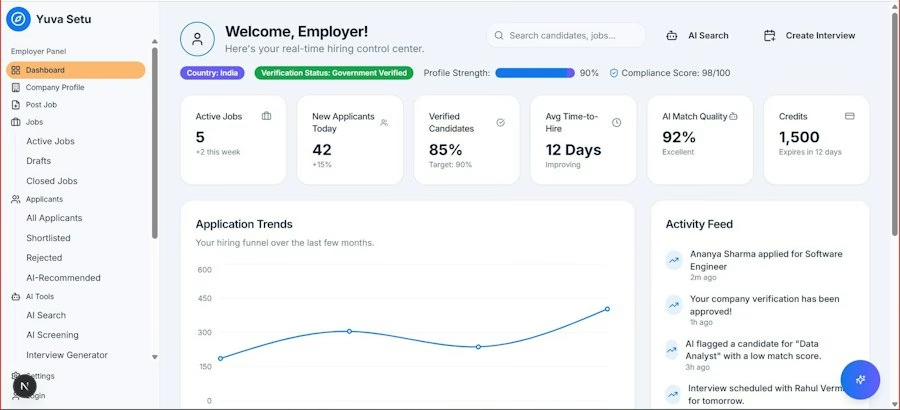

Creating an effective email dashboard for your team isn’t a one-size-fits-all endeavor. It requires careful planning, understanding your team’s specific needs, and a willingness to iterate. You need to tailor the design to what matters most for your particular workflow and team dynamics.
Identifying Your Team’s Unique Email Challenges
Before you start building, take a step back and analyze your team’s current email situation. What are the pain points? Are you struggling with:
- Missed Internal Communication: Is information getting lost between departments or team members?
- Slow Client Responses: Are clients frustrated with your team’s turnaround time?
- Overwhelmed Individuals: Is there a particular team member who seems to be drowning in their inbox?
- Lack of Clarity on Action Items: Do people frequently ask, “Who was supposed to handle that?”
- Repetitive Queries: Are you answering the same questions over and over?
Your answers to these questions will dictate the most critical metrics and visualizations for your dashboard. If slow client responses are the issue, focus on response and resolution times for external communication. If internal communication is the problem, perhaps a dashboard that highlights team member availability and current email load is more appropriate.
In today’s fast-paced business environment, having access to real-time insights is crucial for teams aiming to make quicker decisions. A related article discusses the importance of real-time reporting compared to relying on outdated data, emphasizing how it can unlock profit potential for organizations. You can read more about this in the article on real-time reporting, which complements the insights provided by smart email dashboards. These tools not only streamline communication but also enhance data-driven decision-making, ultimately leading to improved team performance.
Choosing the Right Tools and Platforms
The market offers a spectrum of solutions, from simple dashboarding tools to comprehensive email management platforms. Consider:
- Integrated Solutions: Some email clients or productivity suites offer built-in dashboarding features or integrations that can provide a good starting point.
- Dedicated Dashboard Software: Tools like Geckoboard, Klipfolio, or Databox can connect to various data sources, including email platforms, to create custom dashboards.
- Business Intelligence Platforms: For more advanced analytics and customization, BI tools like Tableau or Power BI offer powerful visualization capabilities.
- Custom Development: If your needs are highly specific, you might consider custom development, though this is typically the most resource-intensive option.
When choosing, think about ease of integration with your existing systems, the level of customization you require, and the budget you have available. Don’t overlook the importance of user-friendliness for your team. A complex dashboard that no one uses is worse than no dashboard at all.
Structuring Your Dashboard for Clarity and Actionability
A cluttered dashboard is counterproductive. Aim for clarity and focus.
Prioritizing Key Visualizations
What are the most important things your team needs to see at a glance?
- At-a-Glance Performance Overview: A high-level summary of key metrics like average response time, total incoming emails, and resolved issues for the day or week.
- Team Workload Monitor: A visual representation of how email volume is distributed across team members. This could be a simple bar chart or a more sophisticated heat map.
- Urgency Tracker: A display that highlights emails flagged as urgent or those approaching critical deadlines.
- Key Inquiry Trends: A chart showing the most frequent topics or questions received, which can inform training or content creation.
- Bottleneck Identification: Visual cues that point to areas where emails are getting stuck, such as specific team members or stages in a workflow.
Implementing Real-time Updates
The power of a dashboard lies in its recency. Ensure your chosen solution provides real-time or near-real-time updates. This allows your team to react swiftly to new information and changing priorities. Imagine a visual indicator that changes color as an email’s urgency level increases or a specific response time threshold is approached. This immediate feedback loop is critical for agile teams.
Leveraging Your Dashboard for Enhanced Team Collaboration

A smart email dashboard is not just a reporting tool; it’s a catalyst for improved teamwork. By providing transparency and shared understanding, you can foster a more cohesive and efficient collaborative environment. You’re not just managing individual inboxes anymore; you’re optimizing the collective communication flow of your team.
Fostering Transparency and Shared Ownership
When everyone can see the team’s email workload and performance, it creates a natural sense of shared responsibility. No one is an island anymore. This transparency can:
- Reduce Blame: Instead of pointing fingers when something is missed, the team can collectively identify where the breakdown occurred and how to prevent it in the future.
- Encourage Proactive Assistance: If a team member’s workload indicator is red, others can see it and proactively offer to help, rather than waiting to be asked or for the problem to escalate.
- Promote Knowledge Sharing: By seeing common inquiries and how they are resolved, team members can learn from each other and develop best practices.
Visualizing Workload Distribution
Imagine a pie chart or bar graph on your dashboard that shows the percentage of emails each team member is handling. If one person’s slice is disproportionately large, it’s an immediate signal for the team lead to intervene, reassign tasks, or investigate the root cause. This visual cue is far more impactful than sporadic check-ins or relying on individuals to voice their overload. You can also use this to identify underutilized team members who might be ready for more responsibility.
Streamlining Communication Workflows
Dashboards can highlight inefficiencies in your team’s communication processes. By analyzing where emails tend to get stuck or delayed, you can identify areas for improvement.
Identifying and Addressing Bottlenecks
Are all customer support emails funneled through one person before being distributed? Is there a specific approval process that consistently causes delays? Your dashboard can make these bottlenecks visible. Once identified, you can implement solutions such as:
- Delegation Strategies: Clearly defining who handles what types of emails or which emails can be directly routed to specific individuals or teams.
- Automated Routing Rules: Setting up your email system to automatically categorize and forward emails based on keywords, sender, or subject.
- Template Creation: Developing pre-written responses for frequently asked questions to speed up reply times and ensure consistency.
- Dedicated Email Addresses: Establishing specific email addresses for different departments or functions (e.g., support
FAQs
What is a smart email dashboard?
A smart email dashboard is a tool that aggregates and visualizes email data in a user-friendly format, allowing teams to quickly analyze and make decisions based on key metrics and insights.
How do smart email dashboards help teams make faster decisions?
Smart email dashboards provide real-time updates on email performance metrics, such as open rates, click-through rates, and conversion rates, enabling teams to identify trends and patterns quickly and make data-driven decisions promptly.
What are some key features of smart email dashboards?
Key features of smart email dashboards include customizable dashboards, automated reporting, interactive data visualizations, performance tracking, and integration with email marketing platforms.
How can teams benefit from using smart email dashboards?
Teams can benefit from using smart email dashboards by gaining valuable insights into their email marketing campaigns, optimizing performance, improving engagement with subscribers, and ultimately achieving better results and ROI.
Are smart email dashboards user-friendly for teams with varying levels of technical expertise?
Yes, smart email dashboards are designed to be user-friendly and intuitive, making it easy for teams with varying levels of technical expertise to navigate, interpret data, and collaborate effectively in making faster decisions based on email performance metrics.