


You, the savvy marketer, the diligent business owner, or the passionate entrepreneur, know the undeniable power of email marketing. It’s not just about sending out beautifully crafted messages; it’s about understanding their impact, optimizing your strategy, and ultimately, driving results. But are you truly harnessing the full potential of your email campaigns? Are you seeing beyond the immediate open rates and click-throughs, delving into the real-time insights that can transform your approach? This guide will empower you to unlock the secrets of real-time email reporting, providing you with a step-by-step roadmap to elevate your email marketing game.
You’ve invested time and effort into your email campaigns. Now, it’s time to see that investment pay off, not just in the long run, but right now. Real-time email reporting isn’t a luxury; it’s a necessity in today’s fast-paced digital landscape. It’s the difference between reacting to problems after they’ve escalated and proactively optimizing your strategy to prevent them.
Why You Can’t Afford to Wait
Imagine launching a crucial promotional email. You wait a day, maybe two, to check the stats. By then, a major issue – perhaps a broken link, a non-rendering image on mobile, or an off-putting subject line – could have significantly impacted your campaign’s performance. Real-time reporting allows you to identify these roadblocks almost instantly.
The Power of Immediate Optimization
With real-time data at your fingertips, you can:
- Spot critical errors: Detect and rectify issues like broken links, rendering problems, or incorrect discount codes within minutes of your send.
- A/B test on the fly: See which subject lines, calls-to-action (CTAs), or email layouts are performing best and adjust subsequent sends accordingly.
- Identify trending topics: Observe sudden surges in engagement around specific content and capitalize on that interest with follow-up campaigns.
- Understand audience behavior in the moment: See who is opening your emails, what they’re clicking, and when they’re engaging, allowing for more personalized and timely follow-ups.
Moving Beyond Vanity Metrics
You might be tracking open rates and click-through rates (CTRs), and that’s a good start. But real-time reporting encourages you to dig deeper. It helps you understand not just if people are opening, but why they are (or aren’t), and what their subsequent actions reveal about their intent.
For those interested in enhancing their email marketing strategies, a related article titled “Crafting an Effective Activity-Based Drip Campaign” offers valuable insights on how to engage your audience through targeted messaging. By understanding the principles of real-time email reporting, marketers can better tailor their drip campaigns to respond to user behavior and preferences. To explore this topic further, you can read the article here: Crafting an Effective Activity-Based Drip Campaign.
Step 1: Laying the Foundation – Setting Up Your Reporting Tools
Before you can unlock real-time insights, you need the right tools and configurations in place. You wouldn’t try to build a house without a blueprint, and you shouldn’t try to master real-time reporting without a solid foundation.
Choosing Your Email Service Provider (ESP) Wisely
Your ESP is the cornerstone of your email marketing efforts. Most modern ESPs offer robust reporting features, but the depth and real-time capabilities can vary significantly.
- Look for comprehensive dashboards: Your ESP should provide an intuitive dashboard that gives you a high-level overview of your campaign performance as it unfolds.
- Evaluate real-time data availability: Confirm that the platform offers real-time metrics for opens, clicks, unsubscribes, and bounces.
- Consider API access: For advanced users, an API can allow you to pull data directly into custom dashboards or business intelligence (BI) tools.
Integrating with Analytics Platforms
While your ESP provides valuable primary data, integrating with external analytics platforms, such as Google Analytics, can paint a much richer picture of user behavior after they click through your email.
- Utilize UTM parameters: This is crucial. Every link in your email should be tagged with UTM parameters (source, medium, campaign, content, term). This allows Google Analytics to attribute traffic and conversions directly back to your email campaigns.
- Set up conversion goals: Define clear conversion goals in Google Analytics (e.g., product purchases, form submissions, content downloads) so you can track the real business impact of your emails.
Establishing Consistent Tracking Conventions
For your real-time data to be truly meaningful, you need consistency. Imagine trying to compare apples and oranges – it’s just not effective.
- Standardize your campaign naming: Develop a clear, consistent naming convention for your email campaigns (e.g., “Promo_WinterSale_Dec2023” or “Newsletter_WeeklyUpdate_Week48”).
- Consistent link tagging: Ensure all team members are using the same UTM parameters and best practices for link tracking.
Step 2: Key Real-Time Metrics You Must Track

Now that your reporting infrastructure is in place, you need to know what to look for. You’re not just scanning numbers; you’re looking for actionable insights.
Open Rates: Beyond the Surface
You might think an open is an open, but real-time open rate tracking provides much more.
- Initial engagement spikes: Observe the immediate surge in open rates within the first hour of your send. This can indicate the effectiveness of your subject line and preheader text.
- Geo-location opens: If your ESP provides it, see where your emails are being opened in real-time. This can reveal surprising geographic interest or indicate issues with time-zone targeting.
- Device distribution: Determine if your email is being opened predominantly on desktop or mobile. If mobile opens are high, and your design isn’t fully responsive, you have an immediate optimization opportunity.
Click-Through Rates (CTR): The Gateway to Action
The CTR is a powerful indicator of how compelling your email content and CTAs are.
- High-performing links identification: Pinpoint which links within your email are generating the most clicks. This tells you what content or offers resonate most with your audience.
- Underperforming links diagnosis: Conversely, identify links that are receiving minimal clicks. Is the CTA unclear? Is the offer not compelling? Is the link broken? Addressing these immediately can salvage campaign performance.
- Click-to-open rate (CTOR): This metric gives you a deeper understanding of engagement among opens. It tells you how effective your content is at driving clicks after someone has opened the email. A high open rate with a low CTOR suggests your subject line is effective, but your content isn’t inspiring action.
Unsubscribes and Spam Complaints: Early Warning Signals
These metrics are crucial for maintaining sender reputation and a healthy email list.
- Unexpected unsubscribe surges: A sudden spike in unsubscribes immediately after a send could indicate a problem with your targeting, content, or frequency. Investigate this immediately.
- Spam complaint alerts: Even a small number of spam complaints can significantly harm your sender reputation. Many ESPs offer real-time alerts for these, allowing you to react quickly.
- Bounce rates (soft and hard): While not strictly “real-time” in the sense of immediate user action, monitoring bounce rates ensures your list health. High soft bounces can indicate temporary server issues, while hard bounces mean an invalid address and should be removed from your list promptly.
Conversion Metrics: The Ultimate Goal
Ultimately, you want your emails to drive tangible business results. Real-time conversion tracking is where the magic happens.
- Attributed revenue/sales: See sales or conversions attributed directly to your email campaign as they occur. This provides immediate ROI data.
- Goal completions: Track sign-ups, downloads, demo requests, or any other defined goal in real-time.
- Average order value (AOV) from email: If applicable, monitor the average value of purchases driven by your email campaigns. This allows you to assess the quality of conversions, not just the quantity.
Step 3: Leveraging Real-Time Data for Immediate Action
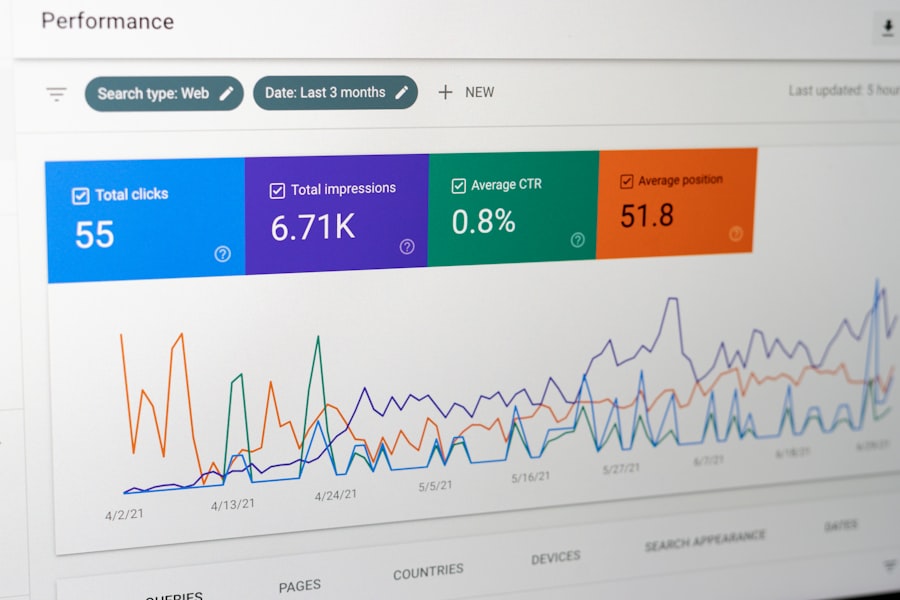
Collecting data is one thing; acting on it is where you truly benefit. Real-time reporting empowers you to be agile and responsive.
Performing A/B Testing and Iteration
Real-time data makes A/B testing incredibly powerful. You don’t have to wait days or weeks for results.
- Dynamic subject line testing: Send a small segment of your audience an email with two different subject lines. Whichever performs better in the first 30-60 minutes can then be used for the vast majority of your remaining audience.
- Call-to-action optimization: Test different CTAs for the same product or offer. See which one generates more clicks in real-time and adjust subsequent emails (or even other marketing materials) accordingly.
- Content layout experiments: Experiment with different sections or visual arrangements within your email body to see what captures attention and drives engagement most effectively.
Addressing Technical Glitches and Errors
This is perhaps the most immediate and impactful benefit of real-time reporting.
- Broken link detection: If you see an immediate drop in CTR for a specific link, or an unusually high bounce rate after clicking, you can suspect a broken link. Fix it, and potentially resend to those who clicked the broken link.
- Image rendering issues: If opens are high but clicks are low, and your email is heavily image-dependent, immediately check for rendering problems across different email clients.
- Discount code malfunctions: If you’re promoting a discount and conversion rates are low despite high clicks, investigate if the discount code is functioning correctly on your website.
Enhancing Audience Segmentation and Personalization
Real-time insights can help you refine your understanding of your audience and deliver more relevant content.
- Identifying new segments: Notice a segment of your audience engaging surprisingly well with a particular piece of content? This could be an opportunity to create a targeted follow-up sequence.
- Timing optimization: Observe when different segments of your audience are most active. You can then schedule future sends to align with these optimal engagement times for maximum impact.
- Dynamic content adjustments: For advanced users, real-time data can be fed into dynamic content systems, allowing you to automatically tailor future email content based on a recipient’s current engagement patterns.
Real-time email reporting is an essential tool for businesses looking to enhance their communication strategies and improve customer engagement. For those interested in maximizing the effectiveness of their online interactions, exploring how to optimize web forms can be incredibly beneficial. A related article that delves into this topic is available at optimizing your web form for higher conversions, which provides insights on increasing conversion rates through effective form design and implementation. By integrating these strategies with real-time email reporting, businesses can achieve a more streamlined and effective approach to their marketing efforts.
Step 4: Beyond the Initial Send – Real-Time Follow-Ups and Automation
| Metric | Description |
|---|---|
| Open Rate | The percentage of recipients who opened the email. |
| Click-Through Rate (CTR) | The percentage of recipients who clicked on a link within the email. |
| Bounce Rate | The percentage of emails that could not be delivered to the recipient’s inbox. |
| Conversion Rate | The percentage of recipients who completed a desired action after clicking on a link within the email. |
| Unsubscribe Rate | The percentage of recipients who opted out of receiving future emails. |
Your journey with real-time reporting doesn’t end once the initial flurry of activity subsides. It extends into intelligent follow-up and automation.
Triggering Automated Workflows
This is where real-time data transforms into real-time action, often without manual intervention.
- Abandoned cart reminders: If a user clicks from your email to a product page but doesn’t convert, trigger an automated abandoned cart email within a few hours.
- Browse abandonment emails: If they click through to browse several products but don’t add to a cart, an email reminding them of their viewed items can re-engage them.
- Engagement-based welcome series: If a new subscriber instantly engages with your welcome email (opens, clicks), you can fast-track them to the next stage of your onboarding sequence, providing a more personalized experience.
Crafting Targeted Re-Engagement Campaigns
Not everyone will engage with your initial send. Real-time reporting helps you identify who didn’t and how to re-engage them.
- Non-opener follow-ups: For subscribers who didn’t open your email within a set timeframe, you can send a follow-up with a different subject line or a tweaked offer.
- Non-clicker follow-ups: For those who opened but didn’t click, consider sending a follow-up email that highlights a different benefit, uses a stronger CTA, or offers additional information related to the original content.
- Inactive segment identification: Continuously monitor which subscribers are consistently not engaging. Real-time insights allow you to pull these segments and run re-engagement campaigns or consider them for list cleaning.
Integrating with Other Marketing Channels
Your email marketing shouldn’t operate in a silo. Real-time data can enrich your efforts across other channels.
- Retargeting ad campaigns: If a user clicks from your email to a specific product page but doesn’t buy, you can use that real-time click data to segment them for a retargeting ad campaign on social media or display networks.
- Personalized website experiences: Feed email engagement data into your website’s personalization engine to show relevant content, offers, or product recommendations when the user revisits your site.
Step 5: Iteration and Continuous Improvement – Making Real-Time a Habit
Unlocking real-time email reporting isn’t a one-time project; it’s an ongoing process of learning, adapting, and optimizing. You’re building a smarter, more responsive marketing machine.
Regular Reporting and Analysis Rituals
You need to bake real-time analysis into your daily or weekly workflow.
- Daily “War Room” checks: For critical campaigns, dedicate a few minutes each morning (or even multiple times a day) to review real-time performance and discuss any immediate adjustments.
- Weekly performance deep dives: On a weekly basis, take a more comprehensive look at your overall email program, identifying trends, successes, and areas for improvement based on aggregated real-time data.
- Post-campaign reviews: After each major campaign, conduct a thorough analysis. What did the real-time data reveal? What worked well? What could be improved for next time?
Documenting Learnings and Best Practices
Don’t let valuable insights vanish into the ether. Document what you learn.
- Maintain a “Lessons Learned” log: Keep a running document of insights gained from real-time reporting. Which subject lines performed best for certain segments? What types of CTAs drove the most conversions?
- Develop internal best practices: Based on your documented learnings, create internal guidelines for email creation, subject line writing, and send times.
- Share insights across teams: Ensure that not only your email marketing team but also sales, content, and product teams are aware of the insights gained from real-time email data. This fosters a data-driven culture across your organization.
Embracing Automation and AI
As you become more adept at leveraging real-time data, you can explore more advanced automation and AI-driven solutions.
- Predictive analytics for send times: Some platforms use AI to predict the optimal send time for individual subscribers based on their historical real-time engagement patterns.
- Content optimization with AI: AI tools can analyze real-time click data to suggest optimal content variations or even generate personalized subject lines.
- Automated anomaly detection: More sophisticated systems can flag unusual spikes or drops in real-time metrics, alerting you to potential issues without constant manual monitoring.
By diligently following these steps, you will transform your approach to email marketing. You’ll move from passively sending emails to actively guiding their performance, making data-driven decisions that will significantly boost your engagement, conversions, and ultimately, your bottom line. The power of real-time email reporting is now yours to unlock.
FAQs
What is real-time email reporting?
Real-time email reporting is a feature that allows users to track and monitor the performance of their email campaigns in real-time. It provides instant data on metrics such as open rates, click-through rates, bounce rates, and more.
How does real-time email reporting work?
Real-time email reporting works by using tracking pixels or code embedded in the email content. When a recipient opens the email or clicks on a link, the tracking code sends data back to the reporting system, allowing for immediate updates on campaign performance.
What are the benefits of using real-time email reporting?
Some benefits of using real-time email reporting include the ability to quickly assess the success of an email campaign, make immediate adjustments to improve performance, and gain insights into recipient behavior.
How can real-time email reporting be used to improve email marketing strategies?
Real-time email reporting can be used to improve email marketing strategies by providing valuable data on recipient engagement, allowing for the optimization of content, timing, and targeting to increase the effectiveness of email campaigns.
What are some best practices for using real-time email reporting?
Best practices for using real-time email reporting include regularly monitoring key metrics, testing different elements of email campaigns, and using the data to make informed decisions about future email marketing efforts.