



You’ve likely experienced it: the generic email, the one-size-fits-all approach that leaves you feeling like just another number. In today’s hyper-competitive digital landscape, that simply won’t cut it. Your customers expect more. They demand relevance, recognition, and a personalized experience that speaks directly to their individual needs and preferences. This is where SmartMail Custom Fields become your powerful ally, transforming your email marketing from a broadcast to a conversation. You’re not just sending emails; you’re crafting tailored journeys, building stronger relationships, and ultimately, driving greater engagement and conversions.
Imagine your customer data as a richly woven tapestry. Standard fields (like name and email) are the foundational threads, essential but limited. SmartMail Custom Fields are the vibrant, unique embellishments that add depth, detail, and individuality to that tapestry. You’re essentially creating your own data points, specific to your business and your customer’s journey, which you can then leverage to craft incredibly precise and impactful email campaigns.
What are Custom Fields, Exactly?
Think of custom fields as bespoke data points you define within your email marketing platform. Instead of being confined to pre-set options, you get to decide what information you want to store about your subscribers. These fields can capture anything from a customer’s favorite product category to their last purchase date, their preferred communication style, or even their birthday. The power lies in your ability to imagine and implement the data that will unlock truly meaningful personalization.
Why Are They Indispensable for Modern Marketers?
In a world saturated with digital communication, standing out is paramount. You need to cut through the noise, and generic messaging simply gets overlooked. Custom fields allow you to:
- Elevate Relevance: Deliver content that directly addresses a subscriber’s interests, pain points, and past interactions with your brand.
- Foster Stronger Relationships: When a subscriber feels understood and valued, their loyalty and engagement with your brand naturally increase. Your emails become less about pushing products and more about providing genuine value.
- Boost Conversion Rates: Personalized emails consistently outperform generic ones. By aligning your offers and messaging with individual preferences, you significantly increase the likelihood of a sale, a sign-up, or any desired action.
- Gain Deeper Insights: The data you collect through custom fields provides a rich source of information about your audience, enabling you to better understand their behaviors, motivations, and preferences. This, in turn, informs not only your email marketing but your broader business strategy.
- Automate Complex Personalization: While the initial setup requires thought, once custom fields are populated, you can automate highly sophisticated personalization at scale, ensuring every subscriber receives a relevant message at the right time.
In addition to exploring the benefits of using SmartMails Custom Fields for deep personalization, you may find it valuable to read about how to effortlessly connect website leads to email campaigns. This related article provides insights into streamlining your lead management process and enhancing your email marketing strategy. You can check it out here: Effortlessly Connect Website Leads to Email Campaigns.
Setting Up Your SmartMail Custom Fields for Success
The true power of custom fields lies in their strategic implementation. You can’t just create fields haphazardly; you need a thoughtful approach to ensure you’re collecting the right data and using it effectively. This is where you, the marketer, become the architect of your personalization strategy.
Identifying Key Data Points for Personalization
Before you even touch your email platform, take a step back and consider what information would truly enhance your communication with your customers. Think about their journey with your brand.
- Demographic Information: Beyond name, consider age, gender, location (even specific neighborhoods for local businesses), and occupation if relevant.
- Behavioral Data: This is gold. What products have they viewed? What content have they downloaded? When was their last purchase? How often do they interact with your emails? What links do they click the most?
- Preference Data: What are their favorite categories? Do they prefer certain colors or styles? What kind of content do they enjoy most (e.g., blog posts, videos, tutorials)?
- Transactional Data: Purchase history, order value, number of purchases, last purchase date, items in abandoned carts.
- Subscription Data: Original signup source, specific interests indicated during signup, preferred communication frequency.
- Loyalty Program Status: Tier level, points balance, next reward threshold.
Choosing the Right Custom Field Types
Different data requires different field types to ensure accuracy and ease of use. Your SmartMail platform will offer various options.
- Text Field: For short, open-ended responses like “Favorite Color” or “Feedback.”
- Number Field: For numerical data such as “Age,” “Number of Purchases,” or “Loyalty Points.”
- Date Field: Essential for “Birthday,” “Anniversary,” or “Last Purchase Date.”
- Dropdown/Select Field: When you want to limit input to a predefined set of options. For instance, “Product Category Preference” (e.g., “Electronics,” “Apparel,” “Home Goods”). This ensures data consistency.
- Checkbox/Boolean Field: For yes/no or true/false options, such as “Subscribed to Newsletter” or “Opted for SMS Alerts.”
- Hidden Field: Often used for internal tracking or to pass data from a form submission without requiring user input. For example, “Referral Source.”
In the quest for effective email marketing, utilizing SmartMails custom fields for deep personalization can significantly enhance engagement and conversion rates. For those looking to further optimize their strategies, exploring the integration of custom APIs can provide a competitive edge. A related article that delves into this topic is available at Unlocking Competitive Advantage with Custom API Integrations, which offers valuable insights on how to leverage technology for improved marketing outcomes.
Best Practices for Data Collection and Maintenance
Collecting data is just the first step. Maintaining its accuracy and relevance is crucial for long-term success. You’re building a valuable asset, and it needs care.
- Progressive Profiling: Don’t ask for everything at once. Gradually collect more data over time through various touchpoints (e.g., preference centers, follow-up surveys, post-purchase forms).
- Integrate with Other Systems: Connect your email platform with your CRM, e-commerce platform, or other databases to automatically sync and update custom field data. This reduces manual effort and ensures consistency.
- Regular Data Audits: Periodically review your custom field data for inaccuracies, outdated information, or fields that are no longer relevant. Remove or update as needed.
- Clear Field Naming Conventions: Use descriptive and consistent names for your custom fields (e.g.,
_firstName,_lastPurchaseAmount,_productCategoryPref). This makes them easier to manage and use. - Educate Your Team: If multiple people are interacting with your email platform, ensure they understand the purpose and importance of each custom field.
Unleashing the Power: Practical Applications of Custom Fields in Email
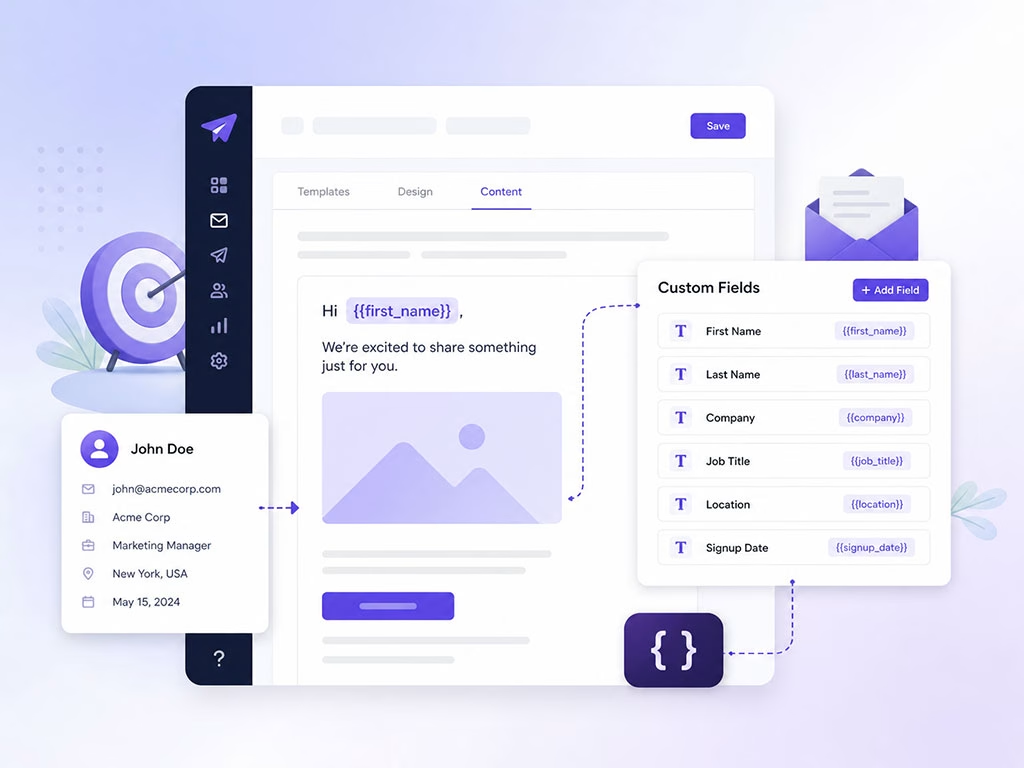
Now that you’ve laid the groundwork, it’s time to see how you can truly transform your email marketing. You’re moving beyond basic segmentation to hyper-personalized communication that resonates deeply with each individual.
Hyper-Personalized Subject Lines and Greetings
This is often the first point of personalization a subscriber encounters, and it’s your chance to make an immediate impact.
- Dynamic Subject Lines: Instead of “New Products Arrived,” try, “Your Favorite [Product Category] Just Got Even Better, [First Name]!” or “Exclusive Deals on [Last Viewed Product] Await You!”
- Customized Greetings: Go beyond “Hi [First Name].” If you have a “Customer Tier” field, you could use “Hello Valued [Customer Tier] Member!” or “Welcome Back, [First Name]!” using an “Last Order Date” field.
- Location-Based Messaging: If you have a “City” field, your subject line could be “Upcoming Event in [City]!” or “Special Offers for Customers in [Zip Code].”
Segmented Campaigns Based on Specific Attributes
Segmentation is good, but custom field-driven segmentation is exceptional. You can create highly targeted groups that receive messages tailored precisely to their needs.
- Behavioral Segments: People who abandoned a cart containing a certain product type receive a follow-up email with a discount on that specific item. Subscribers who clicked on a particular blog post topic receive more content related to that interest.
- Purchase History-Based Segments: Customers who bought a specific product receive an email about complementary items or accessories. Those who haven’t purchased in a while get a re-engagement offer. High-value customers (based on “Total Lifetime Value” field) receive exclusive early access to sales.
- Preference-Based Segments: Subscribers who indicated a preference for “vegan recipes” only receive emails about your plant-based products. Those who opted for “weekly updates” don’t get daily alerts.
- Lifecycle Stage Segmentation: New subscribers (identified by
JoinDatefield) receive onboarding sequences. Long-term loyal customers (identified byCustomerSincefield) receive anniversary rewards.
Dynamic Content Injection for Bespoke Emails
This is where your emails truly become unique for each recipient. You’re not just segmenting; you’re dynamically populating content blocks within a single email template based on individual custom field values.
- Product Recommendations: Inject “Recommended For You: [Product 1], [Product 2]” based on past purchases (stored in a
PurchasedProductsfield) or browsing history (stored in aViewedProductsfield). - Personalized Offers: Display a discount code specific to their “Customer Tier” or offer a free gift based on their “Birthday” field.
- Localized Store Information: If you have multiple retail locations and a “Closest Store ID” field, display the address, hours, and contact information for their nearest store.
- Event Details: If you run events, you can dynamically show them the details for events happening in their “City” or events related to their “Interest Category.”
- Progress Tracking: For subscription services or loyalty programs, display their current progress, points balance (
LoyaltyPointsfield), or next milestone.
Triggered Automations and Workflows Powered by Custom Fields
This is where automation meets advanced personalization. Custom fields become the triggers and conditions that drive complex, multi-step email journeys.
- Welcome Series Tailored by Acquisition Source: A new subscriber whose
SignupSourcefield indicates “Facebook Ad – Discount” receives a welcome series that emphasizes savings, while one from “Blog Post – Education” receives content-rich onboarding. - Birthday/Anniversary Campaigns: A “Birthday” or “Anniversary Date” field triggers an automated email with a special offer or greeting a few days before the actual date.
- Re-engagement for Dormant Customers: If a “Last Activity Date” field hasn’t been updated in X months, trigger a series of emails designed to win them back.
- Product Upsell/Cross-sell Automations: After a customer purchases Product A (updated in a
PurchasedProductsfield), trigger an email sequence promoting complementary Product B. - Feedback Requests Post-Purchase: A “Last Purchase Date” field can trigger a survey request a week after delivery.
- Drip Campaigns Based on Interest: If a subscriber indicates “Interest in X” (custom field), enroll them in a drip campaign specifically about X.
Measuring Success and Iterating Your Personalization Strategy
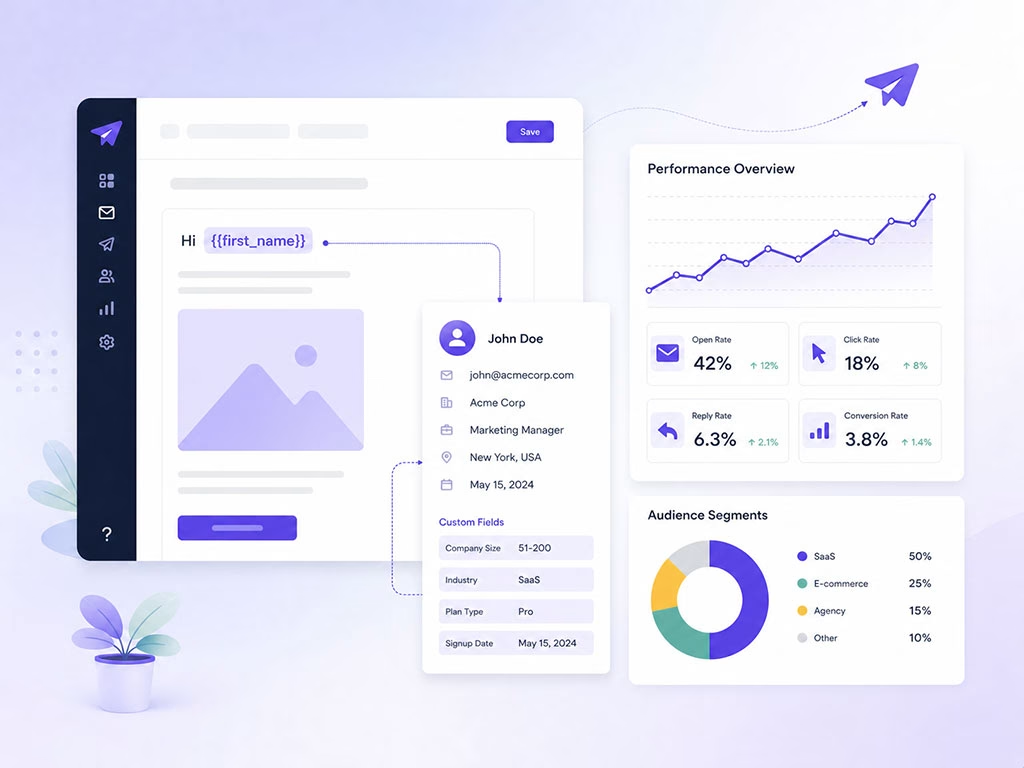
You’ve invested time and effort into setting up your SmartMail Custom Fields; now you need to ensure they’re delivering tangible results. Your personalization strategy is not a static endeavor; it’s an ongoing process of refinement and improvement.
Key Metrics to Monitor for Personalized Campaigns
Generic email marketing metrics won’t fully capture the impact of your personalization efforts. You need to look deeper.
- Open Rates: Higher open rates for personalized subject lines indicate that your efforts to grab attention are effective. Compare personalized vs. generic campaign open rates.
- Click-Through Rates (CTR): A significant increase in CTR suggests that your tailored content and offers are resonating with your audience. Track CTR for specific dynamic content blocks as well.
- Conversion Rates: Ultimately, you want personalization to drive desired actions. Monitor conversion rates (purchases, sign-ups, downloads) specifically for personalized campaigns. A/B test personalized vs. generic calls to action.
- Revenue Per Email: This metric provides a clear picture of the financial impact of your personalization. Higher revenue per email signifies greater effectiveness.
- Reduced Unsubscribe Rates: When subscribers feel understood and receive relevant content, they are less likely to disengage. A low unsubscribe rate for personalized campaigns is a strong indicator of success.
- Customer Lifetime Value (CLTV): Over the long term, effective personalization should contribute to increased customer loyalty and a higher CLTV, as customers are more likely to stay with a brand that consistently delivers value.
A/B Testing Your Personalization Strategies
Never assume you know what will work best. A/B testing is your best friend when it comes to optimizing personalization.
- Subject Line Personalization: Test “Hi [First Name], New Arrivals!” against “New Arrivals Just For You!”
- Content Block Variations: Test different product recommendations based on different data points (e.g., “recently viewed” vs. “similar to past purchases”).
- Call-to-Action (CTA) Personalization: Test a generic CTA like “Shop Now” against “Explore Deals relevant to your [Product Category Preference].”
- Send Time Optimization: While not directly tied to custom fields, personalizing send times based on individual engagement patterns (which can be derived from interaction data) can further enhance campaign performance.
Iterating and Expanding Your Use of Custom Fields
Your initial custom field setup is just the beginning. The digital landscape and your customer base are constantly evolving, and your personalization strategy should too.
- Gather Feedback: Ask your subscribers what they want to see more of (or less of) through preference centers or surveys. Use this qualitative data to inform new custom fields.
- Analyze Data Gaps: Are there insights you wish you had about your customers that you currently don’t? These are opportunities to create new custom fields.
- Leverage New Integrations: As your tech stack grows, explore new integrations that can automatically feed richer data into your SmartMail Custom Fields.
- Experiment with New Personalization Tactics: Don’t be afraid to try novel ways to use your custom fields. What if you personalized the sender name based on a customer’s preferred account manager?
- Stay Agile: The most successful marketers are those who continuously adapt and optimize. Regularly review your custom field strategy, assessing its effectiveness and identifying areas for improvement.
By diligently tracking your metrics, rigorously A/B testing, and continuously refining your approach, you’ll uncover the full potential of SmartMail Custom Fields. You’re not just sending emails; you’re cultivating a dynamic, responsive relationship with each individual in your audience, building true loyalty and driving remarkable results for your business. Embrace the power of deep personalization, and watch your email marketing flourish.
FAQs
What are SmartMails Custom Fields?
SmartMails Custom Fields are placeholders within an email template that can be personalized with specific information about the recipient, such as their name, location, or purchase history.
How can SmartMails Custom Fields be used for deep personalization?
SmartMails Custom Fields can be used to dynamically insert personalized content into email campaigns, such as tailored product recommendations, personalized greetings, or targeted promotional offers based on the recipient’s behavior or preferences.
What types of information can be used in SmartMails Custom Fields?
SmartMails Custom Fields can be populated with a wide range of information, including demographic data, purchase history, browsing behavior, and any other relevant data that can be used to create personalized and targeted email content.
How can SmartMails Custom Fields improve email engagement and conversion rates?
By leveraging SmartMails Custom Fields for deep personalization, marketers can create more relevant and compelling email content that resonates with recipients, leading to higher engagement, increased click-through rates, and ultimately, improved conversion rates.
What are some best practices for using SmartMails Custom Fields effectively?
Some best practices for using SmartMails Custom Fields effectively include regularly updating and maintaining the data used in the custom fields, testing different personalization strategies to see what resonates best with recipients, and ensuring that the personalized content adds value to the recipient’s experience.