


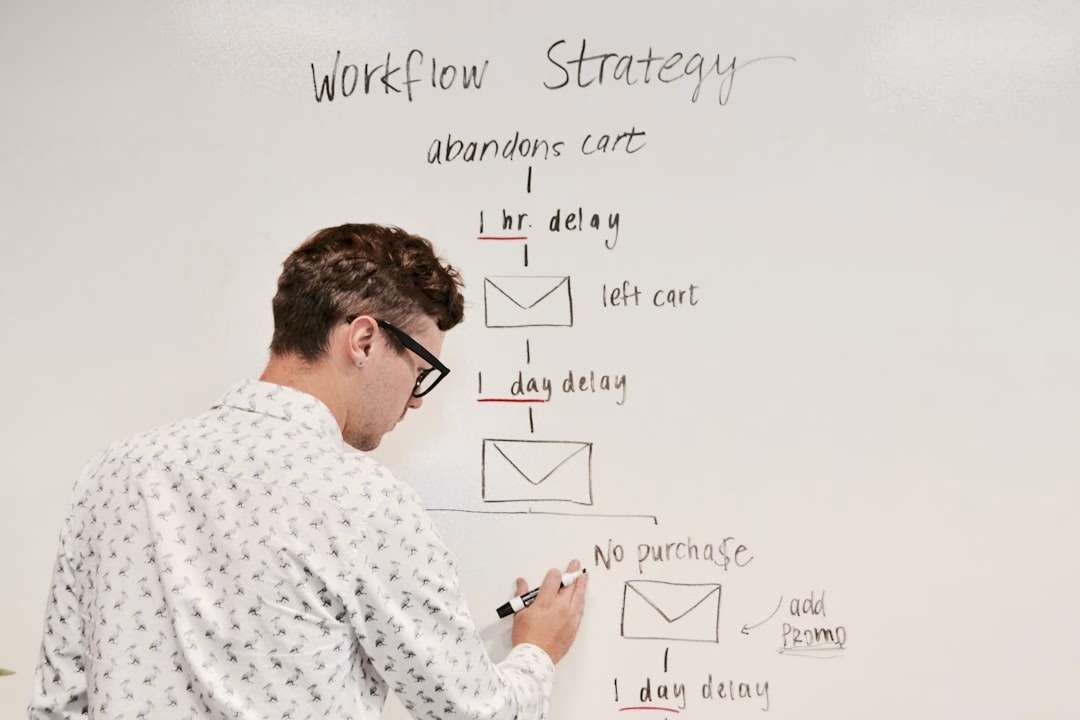
Email automation is a powerful tool that transforms communication with your audience.
Rather than manually sending individual emails, you can establish a system that automatically delivers appropriate messages at optimal times.
Understanding email automation fundamentals allows for streamlined marketing efforts and enhanced customer engagement. Email automation saves time and increases efficiency by enabling lead nurturing without personal intervention for each message. You can create email sequences triggered by user actions such as newsletter sign-ups or purchases.
This ensures timely communication while allowing you to focus on other business priorities as your automated emails operate independently in the background.
Key Takeaways
- Email automation enhances marketing efficiency by sending timely, personalized messages based on user behavior.
- Selecting the right platform depends on features like ease of use, integration options, and scalability.
- Building and segmenting your email list ensures targeted, relevant communication that boosts engagement.
- Testing workflows and analyzing performance metrics are crucial for optimizing campaign effectiveness.
- Integrating automation with other marketing tools and employing advanced strategies maximizes overall success.
Choosing the Right Email Automation Platform
Selecting the right email automation platform is crucial for your success. With numerous options available, it’s essential to evaluate each platform based on your specific needs and goals. Start by considering the features that matter most to you, such as ease of use, integration capabilities, and customer support.
A user-friendly interface can make a significant difference in how effectively you can implement your email campaigns. Additionally, think about scalability. As your business grows, your email marketing needs may evolve.
Choose a platform that can accommodate your growth without requiring a complete overhaul of your existing setup. Look for platforms that offer robust analytics and reporting tools, as these will help you track the performance of your campaigns and make informed decisions moving forward.
Building Your Email List for Automation

A successful email automation strategy begins with a solid email list. Without a well-curated list of subscribers, even the best automated campaigns will fall flat. Start by implementing various strategies to attract subscribers, such as offering valuable content, exclusive discounts, or free resources in exchange for their email addresses.
This not only incentivizes sign-ups but also ensures that your audience is genuinely interested in what you have to offer. Once you have started building your list, focus on maintaining its quality. Regularly clean your list by removing inactive subscribers and ensuring that your contacts are engaged.
This will improve your open rates and overall campaign performance.
Creating Effective Email Campaigns
Crafting effective email campaigns is an art that requires careful planning and execution. Begin by defining the purpose of each campaign. Are you looking to promote a new product, share valuable content, or drive traffic to your website?
Having a clear objective will guide your content creation and help you measure success later on. Next, pay attention to the design and layout of your emails. A visually appealing email with a clear call-to-action (CTA) can significantly impact engagement rates.
Use compelling subject lines to grab attention and encourage opens. Additionally, ensure that your emails are mobile-friendly, as a significant portion of users access their emails on mobile devices. By prioritizing both content and design, you can create campaigns that resonate with your audience and drive desired actions.
Personalizing Your Automated Emails
| Step | Topic | Key Learning Objectives | Estimated Time | Tools/Resources | Metrics to Track |
|---|---|---|---|---|---|
| 1 | Introduction to Email Automation | Understand basics and benefits of email automation | 2 hours | Articles, Introductory Videos | Completion rate of intro materials |
| 2 | Email Marketing Fundamentals | Learn about email list building, segmentation, and compliance | 4 hours | Online courses, eBooks | Quiz scores, list growth rate |
| 3 | Choosing an Email Automation Platform | Compare features of popular platforms and select one | 3 hours | Platform trials, comparison guides | Platform selection time, trial usage stats |
| 4 | Designing Automated Email Workflows | Create drip campaigns, triggers, and sequences | 5 hours | Platform tutorials, workflow templates | Number of workflows created, error rate |
| 5 | Writing Effective Email Content | Craft engaging subject lines and body copy | 4 hours | Copywriting guides, A/B testing tools | Open rates, click-through rates |
| 6 | Testing and Optimization | Implement A/B tests and analyze results | 3 hours | Analytics dashboards, testing tools | Improvement in engagement metrics |
| 7 | Advanced Automation Techniques | Use conditional logic, personalization, and integrations | 6 hours | Advanced tutorials, API documentation | Conversion rates, automation complexity |
| 8 | Monitoring and Reporting | Track campaign performance and generate reports | 2 hours | Reporting tools, dashboards | Report accuracy, frequency of monitoring |
| 9 | Compliance and Best Practices | Understand GDPR, CAN-SPAM, and ethical emailing | 2 hours | Legal resources, compliance checklists | Compliance audit results |
| 10 | Capstone Project | Build and launch a complete automated email campaign | 8 hours | All learned tools and resources | Campaign performance metrics (open, click, conversion) |
Personalization is key to making your automated emails feel relevant and engaging. When subscribers receive messages that speak directly to their interests or behaviors, they are more likely to engage with your content. Start by collecting data on your subscribers’ preferences and behaviors through sign-up forms or surveys.
This information will allow you to tailor your messages accordingly. Incorporate personalization elements into your emails, such as using the subscriber’s name in the greeting or recommending products based on past purchases. You can also segment your audience based on their interests or demographics to create more targeted campaigns.
The more personalized your emails are, the more likely they are to resonate with your audience and drive conversions.
Segmenting Your Email List for Targeted Automation

Segmentation is a powerful strategy that allows you to divide your email list into smaller groups based on specific criteria. By segmenting your audience, you can send targeted messages that are more likely to resonate with each group. Consider factors such as demographics, purchase history, or engagement levels when creating segments.
For example, if you run an e-commerce store, you might segment your list into categories like frequent buyers, occasional shoppers, and first-time visitors. This enables you to tailor your messaging accordingly—offering exclusive discounts to frequent buyers while nurturing first-time visitors with helpful content about your products. By sending relevant messages to each segment, you can improve engagement rates and drive higher conversions.
Setting Up Triggers and Workflows
Triggers and workflows are essential components of an effective email automation strategy. A trigger is an event that initiates an automated email sequence, such as a subscriber signing up for a newsletter or abandoning a shopping cart. Workflows are the series of actions that follow the trigger, guiding subscribers through a tailored experience based on their behavior.
To set up effective triggers and workflows, start by mapping out the customer journey. Identify key touchpoints where automated emails can enhance the experience—such as welcome emails for new subscribers or follow-up emails after a purchase. By creating well-defined workflows that respond to specific actions, you can ensure timely communication that keeps subscribers engaged and encourages them to take further action.
Testing and Optimizing Your Automated Emails
Testing is a critical step in optimizing your automated emails for better performance. A/B testing allows you to compare different versions of an email to determine which one resonates more with your audience. You can test various elements such as subject lines, content layout, images, and CTAs to see what drives higher engagement rates.
Once you’ve gathered data from your tests, analyze the results to identify trends and insights. Use this information to refine your future campaigns and make data-driven decisions. Continuous optimization is key; even small adjustments can lead to significant improvements in open rates and conversions over time.
Integrating Email Automation with Other Marketing Tools
To maximize the effectiveness of your email automation efforts, consider integrating it with other marketing tools in your arsenal. For instance, connecting your email platform with customer relationship management (CRM) software can provide valuable insights into customer behavior and preferences. This integration allows for more personalized communication based on comprehensive customer data.
Additionally, consider integrating social media platforms or analytics tools to enhance your marketing strategy further. By creating a cohesive ecosystem where all tools work together seamlessly, you can streamline processes and gain deeper insights into customer interactions across various channels.
Monitoring and Analyzing Email Automation Performance
Monitoring the performance of your automated emails is essential for understanding their impact on your overall marketing strategy. Utilize analytics tools provided by your email platform to track key metrics such as open rates, click-through rates (CTR), conversion rates, and unsubscribe rates. These metrics will give you valuable insights into how well your campaigns are performing.
Regularly reviewing this data allows you to identify trends over time and make informed decisions about future campaigns. If certain emails consistently underperform, consider revisiting their content or targeting strategy. By staying proactive in monitoring performance, you can continuously improve your email automation efforts and achieve better results.
Advanced Strategies for Email Automation Success
Once you’ve mastered the basics of email automation, consider implementing advanced strategies to take your campaigns to the next level. One effective approach is leveraging behavioral triggers—sending emails based on specific actions taken by subscribers on your website or within previous emails. For example, if a subscriber clicks on a particular product link but doesn’t make a purchase, you could send them a follow-up email with additional information or an exclusive discount.
Another advanced strategy involves using dynamic content within your emails. This allows you to customize sections of an email based on subscriber data or preferences automatically. For instance, if you have different product lines catering to various demographics, dynamic content can display relevant products based on the recipient’s profile.
By exploring these advanced strategies and continually refining your approach, you can enhance the effectiveness of your email automation efforts and drive greater engagement with your audience over time. Embrace the power of automation while remaining adaptable to changes in consumer behavior and preferences—this will be key to achieving long-term success in your email marketing endeavors.
To enhance your understanding of email automation, you might find it beneficial to explore the article on mastering email sequences, which provides valuable examples, templates, and best practices. This resource complements the insights offered in “A Step by Step Learning Path to Master Email Automation” by diving deeper into the intricacies of creating effective email sequences. You can read more about it here: Mastering Email Sequences: Examples, Templates, Best Practices.